如果是在Windows 11系统下,下载nmrpflash-0.9.26-win32.zip,解压出来exe文件
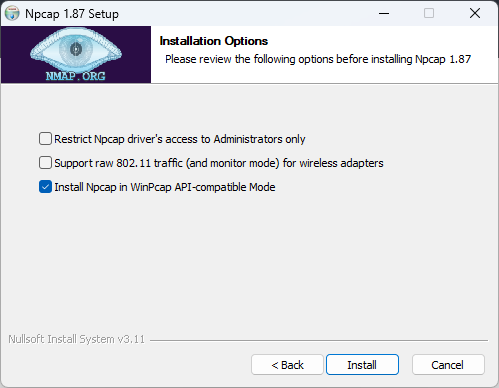
https://github.com/jclehner/nmrpflash运行nmrpflash出现找不到wpcap.dll在安装下载安装npcap,不出现找不到dll可以不安装
https://npcap.com/#download
网件官方下载WAX206固件的最新版Firmware Version 1.0.5.3,并解压img文件
https://www.netgear.com/support/product/wax206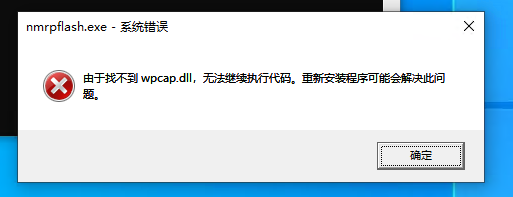
假如我把以上三个文件放到桌面的206文件夹,在CMD以管理员模式运行(shell下不行)
cd到当前文件夹
cd C:\Users\LEISHEN\Desktop\206运行如下命令,前提只保留一个网卡,其他网卡都禁用,如果有多个网卡可能会导致运行失败,uboot官方没有改动过,否则容易导致变砖
nmrpflash.exe -L# 输出如下结果
eth11 10.0.0.11 91:6b:01:71:22:11 (以太网)千万不要回车命令行,先把以下命令输入到CMD待定,其中eth11就是上级命令获取的名称
nmrpflash.exe -i eth11 -f "C:\Users\LEISHEN\Desktop\206\WAX206-V1.0.5.3.img"上述命令输入完成,路由器拔掉电源,在回车上述命令,在通电,顷刻开始输出如下结果:
#输出结果如下
Waiting for Ethernet connection (Ctrl-C to skip).
Warning: IP address marked as deprecated.
Advertising NMRP server on eth11 ... |
Received configuration request from 391:6b:01:71:22:11.
Sending configuration: 10.164.183.253/24.
Received upload request: filename 'firmware'.
Uploading WAX206-V1.0.5.3.img ... OK (26608168 b)
Waiting for remote to respond.
Received keep-alive request (1).
Remote finished. Closing connection.
Reboot your device now.路由器开始重启,如果10多分钟过去,还没有获取到IP,那就拔掉电源在插上,一般2-3分钟即可获取到IP,可以登录网件官方管理地址https://www.routerlogin.com/ 进行设置,登录之后最好做个恢复出厂设置,没啥问题就可以安心使用刷回的官方原厂固件了。
刷回原厂再次恢复出厂正常了,其他的网卡正常启动即可。
原创文章,作者:开心电脑网,如若转载,请注明出处。