
OpenClaw 在Windows 11 快速配置方法,输入命令,开始配置:
openclaw onboard如果在线升级,Windows 原生环境,先尽量减少可选依赖和杂项检查,更容易升级,如下命令:
npm install -g openclaw@latest --force --omit=optional --no-audit --no-fund --loglevel verbose升级完成后,重启本地OpenClaw服务
openclaw gateway restart🦞 OpenClaw 2026.3.2 (85377a2) — Hot reload for config, cold sweat for deploys.
Windows detected — OpenClaw runs great on WSL2!
Native Windows might be trickier.
Quick setup: wsl --install (one command, one reboot)
Guide: https://docs.openclaw.ai/windows
▄▄▄▄▄▄▄▄▄▄▄▄▄▄▄▄▄▄▄▄▄▄▄▄▄▄▄▄▄▄▄▄▄▄▄▄▄▄▄▄▄▄▄▄▄▄▄▄▄▄▄▄
██░▄▄▄░██░▄▄░██░▄▄▄██░▀██░██░▄▄▀██░████░▄▄▀██░███░██
██░███░██░▀▀░██░▄▄▄██░█░█░██░█████░████░▀▀░██░█░█░██
██░▀▀▀░██░█████░▀▀▀██░██▄░██░▀▀▄██░▀▀░█░██░██▄▀▄▀▄██
▀▀▀▀▀▀▀▀▀▀▀▀▀▀▀▀▀▀▀▀▀▀▀▀▀▀▀▀▀▀▀▀▀▀▀▀▀▀▀▀▀▀▀▀▀▀▀▀▀▀▀▀
🦞 OPENCLAW 🦞1.I understand this is personal-by-default and shared/multi-user use requires lock-down. Continue?
│ ● Yes / ○ No
注释:按← 选择Yes ,回车确认,单独使用,并且了解其中的风险,可以选择 Yes 继续。如果你不确定是否适合多人使用,可以选择 No。
2. QuickStart Configuration(QuickStart 配置)
2.0 Onboarding mode (引导模式)
│ ● QuickStart (Configure details later via openclaw configure.)
注释:默认选择,回车确认,选择 QuickStart,之后再根据需要配置。如果你希望从一开始就进行详细设置,可以选择 Manual。
2.1 Model/Auth Provider(模型/认证提供商)
│ ● Skip for now
注释:按↑Skip for now选择跳过此步骤,回车确认,使用默认设置,稍后可以根据需要配置模型提供商。
2.2 Filter Models by Provider(过滤模型提供商)
│ ● All providers
注释:默认选择,回车确认,选择所有可用的提供商模型,适合没有特别偏好的用户,能提供更多灵活性。
2.3 Default Model(默认模型)
│ ● Keep current (default: anthropic/claude-opus-4-6)
注释:默认选择,回车确认,模型 anthropic/claude-opus-4-6,如果没有特定需求,可以保持此设置,稍后再进行更改。
2.4 Select channel (QuickStart)(通道设置)
│ ● Skip for now (You can add channels later via `openclaw channels add`)
注释:按↑Skip for now选择跳过此步骤,回车确认,稍后可以使用命令 openclaw channels add 添加通道。
3. Skills Configuration(技能配置)
3.1 Configure skills now? (recommended)(立即配置技能?)
│ ○ Yes / ● No
注释:选择No ,回车确认,跳过立即配置技能,稍后可以通过命令行手动配置技能。
3.2 Hooks
Enable hooks? (钩子配置)
│ ◼ Skip for now
注释:默认选择,空格键 选中,回车确认,跳过钩子配置,稍后可以根据需求启用钩子来自动化某些操作。
3.3 弹窗 node.js JavaScript runtime 允许
3.4 How do you want to hatch your bot?
│ ● Open the Web UI
注释:↓ 选择 Open the Web UI,回车确认,选择通过 Web 界面启动 OpenClaw,便于图形化管理。如果你更习惯于命令行操作,可以选择 Hatch in TUI。
默认web界面地址:
Web UI: http://127.0.0.1:18789/ 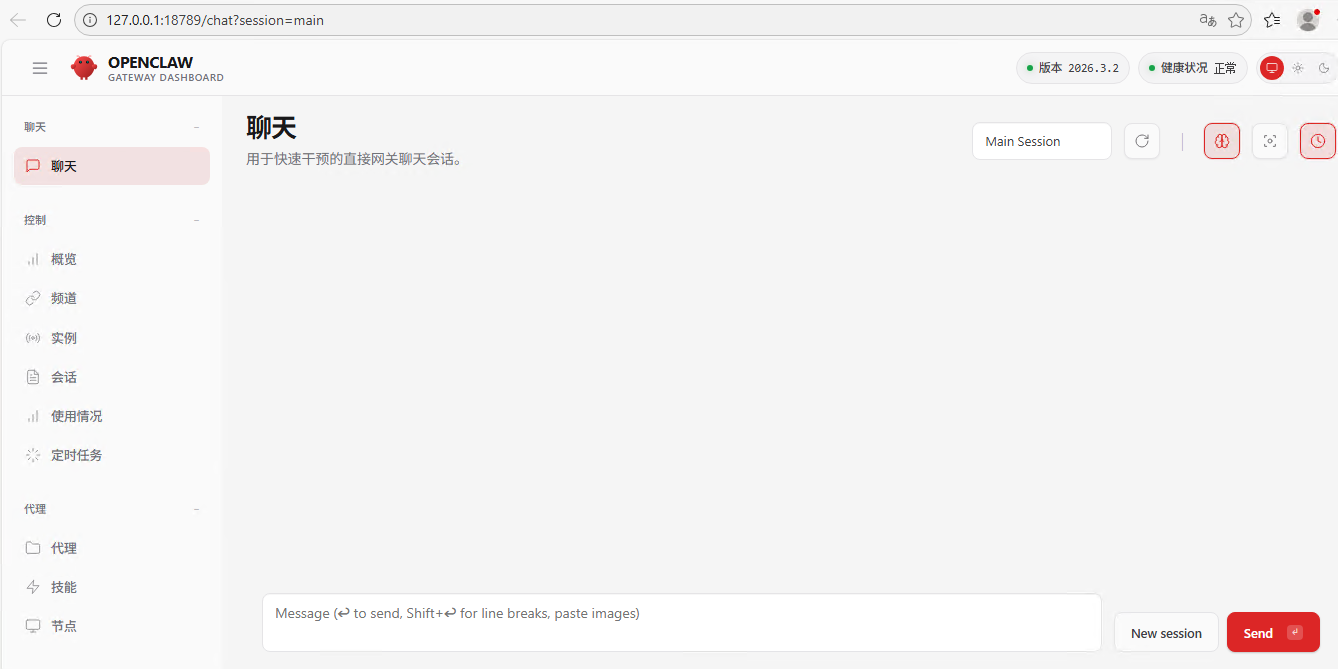
┌ OpenClaw onboarding
│
◇ Security ─────────────────────────────────────────────────────────────────────────────────╮
│ │
│ Security warning — please read. │
│ │
│ OpenClaw is a hobby project and still in beta. Expect sharp edges. │
│ By default, OpenClaw is a personal agent: one trusted operator boundary. │
│ This bot can read files and run actions if tools are enabled. │
│ A bad prompt can trick it into doing unsafe things. │
│ │
│ OpenClaw is not a hostile multi-tenant boundary by default. │
│ If multiple users can message one tool-enabled agent, they share that delegated tool │
│ authority. │
│ │
│ If you’re not comfortable with security hardening and access control, don’t run │
│ OpenClaw. │
│ Ask someone experienced to help before enabling tools or exposing it to the internet. │
│ │
│ Recommended baseline: │
│ - Pairing/allowlists + mention gating. │
│ - Multi-user/shared inbox: split trust boundaries (separate gateway/credentials, ideally │
│ separate OS users/hosts). │
│ - Sandbox + least-privilege tools. │
│ - Shared inboxes: isolate DM sessions (`session.dmScope: per-channel-peer`) and keep │
│ tool access minimal. │
│ - Keep secrets out of the agent’s reachable filesystem. │
│ - Use the strongest available model for any bot with tools or untrusted inboxes. │
│ │
│ Run regularly: │
│ openclaw security audit --deep │
│ openclaw security audit --fix │
│ │
│ Must read: https://docs.openclaw.ai/gateway/security │
│ │
├────────────────────────────────────────────────────────────────────────────────────────────╯
│
◇ I understand this is personal-by-default and shared/multi-user use requires lock-down. Continue?
│ Yes
│
◇ Onboarding mode
│ QuickStart
│
◇ QuickStart ─────────────────────────╮
│ │
│ Gateway port: 18789 │
│ Gateway bind: Loopback (127.0.0.1) │
│ Gateway auth: Token (default) │
│ Tailscale exposure: Off │
│ Direct to chat channels. │
│ │
├──────────────────────────────────────╯
│
◇ Model/auth provider
│ Skip for now
│
◇ Filter models by provider
│ All providers
│
◇ Default model
│ Keep current (default: anthropic/claude-opus-4-6)
│
◇ Model check ───────────────────────────────────────────────────────────────────────────╮
│ │
│ No auth configured for provider "anthropic". The agent may fail until credentials are │
│ added. │
│ │
├─────────────────────────────────────────────────────────────────────────────────────────╯
│
◇ Channel status ────────────────────────────╮
│ │
│ Telegram: needs token │
│ WhatsApp (default): not linked │
│ Discord: needs token │
│ Slack: needs tokens │
│ Signal: needs setup │
│ signal-cli: missing (signal-cli) │
│ iMessage: needs setup │
│ imsg: missing (imsg) │
│ IRC: not configured │
│ Google Chat: not configured │
│ Feishu: install plugin to enable │
│ Google Chat: install plugin to enable │
│ Nostr: install plugin to enable │
│ Microsoft Teams: install plugin to enable │
│ Mattermost: install plugin to enable │
│ Nextcloud Talk: install plugin to enable │
│ Matrix: install plugin to enable │
│ BlueBubbles: install plugin to enable │
│ LINE: install plugin to enable │
│ Zalo: install plugin to enable │
│ Zalo Personal: install plugin to enable │
│ Synology Chat: install plugin to enable │
│ Tlon: install plugin to enable │
│ │
├─────────────────────────────────────────────╯
│
◇ How channels work ───────────────────────────────────────────────────────────────────────╮
│ │
│ DM security: default is pairing; unknown DMs get a pairing code. │
│ Approve with: openclaw pairing approve <channel> <code> │
│ Public DMs require dmPolicy="open" + allowFrom=["*"]. │
│ Multi-user DMs: run: openclaw config set session.dmScope "per-channel-peer" (or │
│ "per-account-channel-peer" for multi-account channels) to isolate sessions. │
│ Docs: channels/pairing │
│ │
│ Telegram: simplest way to get started — register a bot with @BotFather and get going. │
│ WhatsApp: works with your own number; recommend a separate phone + eSIM. │
│ Discord: very well supported right now. │
│ IRC: classic IRC networks with DM/channel routing and pairing controls. │
│ Google Chat: Google Workspace Chat app with HTTP webhook. │
│ Slack: supported (Socket Mode). │
│ Signal: signal-cli linked device; more setup (David Reagans: "Hop on Discord."). │
│ iMessage: this is still a work in progress. │
│ Feishu: 飞书/Lark enterprise messaging with doc/wiki/drive tools. │
│ Nostr: Decentralized protocol; encrypted DMs via NIP-04. │
│ Microsoft Teams: Bot Framework; enterprise support. │
│ Mattermost: self-hosted Slack-style chat; install the plugin to enable. │
│ Nextcloud Talk: Self-hosted chat via Nextcloud Talk webhook bots. │
│ Matrix: open protocol; install the plugin to enable. │
│ BlueBubbles: iMessage via the BlueBubbles mac app + REST API. │
│ LINE: LINE Messaging API bot for Japan/Taiwan/Thailand markets. │
│ Zalo: Vietnam-focused messaging platform with Bot API. │
│ Zalo Personal: Zalo personal account via QR code login. │
│ Synology Chat: Connect your Synology NAS Chat to OpenClaw with full agent capabilities. │
│ Tlon: decentralized messaging on Urbit; install the plugin to enable. │
│ │
├───────────────────────────────────────────────────────────────────────────────────────────╯
│
◇ Select channel (QuickStart)
│ Skip for now
Updated ~\.openclaw\openclaw.json
Workspace OK: ~\.openclaw\workspace
Sessions OK: ~\.openclaw\agents\main\sessions
│
◇ Skills status ─────────────╮
│ │
│ Eligible: 3 │
│ Missing requirements: 40 │
│ Unsupported on this OS: 8 │
│ Blocked by allowlist: 0 │
│ │
├─────────────────────────────╯
│
◇ Configure skills now? (recommended)
│ No
│
◇ Hooks ──────────────────────────────────────────────────────────────────╮
│ │
│ Hooks let you automate actions when agent commands are issued. │
│ Example: Save session context to memory when you issue /new or /reset. │
│ │
│ Learn more: https://docs.openclaw.ai/automation/hooks │
│ │
├──────────────────────────────────────────────────────────────────────────╯
│
◇ Enable hooks?
│ Skip for now
Config overwrite: C:\Users\WIN26H11\.openclaw\openclaw.json (sha256 db7fad0cba13f58a1b4609a4ec4aa4498c2fa18f33bbc7aa4f38347ff46ed37b -> 19c6c10cc545c2ffceec8236fdcd8dc6f3eaf659a261f8d014fe1345f2c839a2, backup=C:\Users\WIN26H11\.openclaw\openclaw.json.bak)
│
◇ Gateway service runtime ────────────────────────────────────────────╮
│ │
│ QuickStart uses Node for the Gateway service (stable + supported). │
│ │
├──────────────────────────────────────────────────────────────────────╯
│
◒ Installing Gateway service…
Installed Scheduled Task: OpenClaw Gateway
Task script: C:\Users\WIN26H11\.openclaw\gateway.cmd
◇ Gateway service installed.
│
◇
Agents: main (default)
Heartbeat interval: 30m (main)
Session store (main): C:\Users\WIN26H11\.openclaw\agents\main\sessions\sessions.json (0 entries)
│
◇ Optional apps ────────────────────────╮
│ │
│ Add nodes for extra features: │
│ - macOS app (system + notifications) │
│ - iOS app (camera/canvas) │
│ - Android app (camera/canvas) │
│ │
├────────────────────────────────────────╯
│
◇ Control UI ─────────────────────────────────────────────────────────────────────╮
│ │
│ Web UI: http://127.0.0.1:18789/ │
│ Web UI (with token): │
│ http://127.0.0.1:18789/#token=1c0a208f23b9e43361f947a3344230e00582212873f19740 │
│ Gateway WS: ws://127.0.0.1:18789 │
│ Gateway: reachable │
│ Docs: https://docs.openclaw.ai/web/control-ui │
│ │
├──────────────────────────────────────────────────────────────────────────────────╯
│
◇ Start TUI (best option!) ─────────────────────────────────╮
│ │
│ This is the defining action that makes your agent you. │
│ Please take your time. │
│ The more you tell it, the better the experience will be. │
│ We will send: "Wake up, my friend!" │
│ │
├────────────────────────────────────────────────────────────╯
│
◇ Token ─────────────────────────────────────────────────────────────────────────────────╮
│ │
│ Gateway token: shared auth for the Gateway + Control UI. │
│ Stored in: ~/.openclaw/openclaw.json (gateway.auth.token) or OPENCLAW_GATEWAY_TOKEN. │
│ View token: openclaw config get gateway.auth.token │
│ Generate token: openclaw doctor --generate-gateway-token │
│ Web UI stores a copy in this browser's localStorage (openclaw.control.settings.v1). │
│ Open the dashboard anytime: openclaw dashboard --no-open │
│ If prompted: paste the token into Control UI settings (or use the tokenized dashboard │
│ URL). │
│ │
├─────────────────────────────────────────────────────────────────────────────────────────╯
│
◇ How do you want to hatch your bot?
│ Open the Web UI
│
◇ Dashboard ready ────────────────────────────────────────────────────────────────╮
│ │
│ Dashboard link (with token): │
│ http://127.0.0.1:18789/#token=1c0a208f23b9e43361f947a3344230e00582212873f19740 │
│ Opened in your browser. Keep that tab to control OpenClaw. │
│ │
├──────────────────────────────────────────────────────────────────────────────────╯
│
◇ Workspace backup ────────────────────────────────────────╮
│ │
│ Back up your agent workspace. │
│ Docs: https://docs.openclaw.ai/concepts/agent-workspace │
│ │
├───────────────────────────────────────────────────────────╯
│
◇ Security ──────────────────────────────────────────────────────╮
│ │
│ Running agents on your computer is risky — harden your setup: │
│ https://docs.openclaw.ai/security │
│ │
├─────────────────────────────────────────────────────────────────╯
│
◇ Shell completion ───────────────────────────────────────────────────────╮
│ │
│ Shell completion installed. Restart your shell or run: source ~/.zshrc │
│ │
├──────────────────────────────────────────────────────────────────────────╯
│
◇ Web search (optional) ─────────────────────────────────────────────────────────────────╮
│ │
│ If you want your agent to be able to search the web, you’ll need an API key. │
│ │
│ OpenClaw uses Brave Search for the `web_search` tool. Without a Brave Search API key, │
│ web search won’t work. │
│ │
│ Set it up interactively: │
│ - Run: openclaw configure --section web │
│ - Enable web_search and paste your Brave Search API key │
│ │
│ Alternative: set BRAVE_API_KEY in the Gateway environment (no config changes). │
│ Docs: https://docs.openclaw.ai/tools/web │
│ │
├─────────────────────────────────────────────────────────────────────────────────────────╯
│
◇ What now ─────────────────────────────────────────────────────────────╮
│ │
│ What now: https://openclaw.ai/showcase ("What People Are Building"). │
│ │
├────────────────────────────────────────────────────────────────────────╯
│
└ Onboarding complete. Dashboard opened; keep that tab to control OpenClaw.原创文章,作者:开心电脑网,如若转载,请注明出处。