
Windows 11配置OpenClaw环境通关一键安装脚本

Windows 11配置OpenClaw环境通关一键安装脚本

同窗口自愈:利用 $env:Path 实时刷新技术,解决了“装完 Git 但当前窗口不认识”的问题。你不需要关掉再开,也不需要重启。

全镜像替换:彻底抛弃了 winget 访问 GitHub 的逻辑。Node、Python、Git 全部改用阿里/华为/腾讯的镜像站,下载速度起码提升 50 倍。

防止假文件:CMake 换成了 ghp.ci 加速代理拉取,这样下回来的就是 30MB 的安装包,而不是 9KB 的 HTML 错误页。

Windows 11配置OpenClaw环境通关一键安装脚本

路径即时生效:在安装完 Git 后立即刷新 $env:Path,解决了“明明装了 Git 却报命令找不到”的问题。

逻辑闭环:把你要求的 insteadOf 加速和 python 路径锁定放到了编译开始前的最后一秒,确保 npm install 绝对不挂。

一键安装脚本依次完成:

Node/Python/Git 镜像强装 -> CMake 路径对齐 -> VS 编译链补齐 -> OpenClaw 最终安装

# ==========================================================
# OpenClaw 2026 全系统初始化 - 物理镜像增强版
# 目标:解决 GitHub 连不上、权限被禁、路径不识别、假文件下载
# ==========================================================

# 1. 权限与策略解锁 (解决 npm.ps1 无法运行的问题)
Set-ExecutionPolicy -ExecutionPolicy RemoteSigned -Scope CurrentUser -Force
Write-Host ">>> 系统策略已解锁,开始执行全环境物理植入 <<<" -ForegroundColor Cyan

# 2. 核心组件强装 (全部采用国内镜像物理直链)
Write-Host "[1/4] 正在从高速镜像站拉取 Node, Python, Git..." -ForegroundColor Yellow

$tools = @{
    "Node.js" = "https://mirrors.huaweicloud.com/nodejs/v24.14.0/node-v24.14.0-x64.msi";
    "Python"  = "https://npmmirror.com/mirrors/python/3.11.9/python-3.11.9-amd64.exe";
    "Git"     = "https://npmmirror.com/mirrors/git-for-windows/v2.53.0.windows.1/Git-2.53.0-64-bit.exe"
}

foreach ($name in $tools.Keys) {
    $ext = if ($name -eq "Node.js") { "msi" } else { "exe" }
    $tempPath = "$env:TEMP\$name.$ext"
    Write-Host "正在高速下载 $name..." -ForegroundColor Gray
    curl.exe -L -o $tempPath $tools[$name]
    
    # 自动执行静默安装
    if ($name -eq "Node.js") { Start-Process msiexec.exe -ArgumentList "/i `"$tempPath`" /qn /norestart" -Wait }
    if ($name -eq "Python")  { Start-Process $tempPath -ArgumentList "/quiet InstallAllUsers=1 PrependPath=1" -Wait }
    if ($name -eq "Git")     { Start-Process $tempPath -ArgumentList "/VERYSILENT /NORESTART /NOCANCEL /SP-" -Wait }
    Remove-Item $tempPath
}

# 3. 部署 CMake 与 VS 编译链 (本地编译 node-llama-cpp 必需)
Write-Host "[2/4] 正在配置 C++ 编译环境 (预计需 3-5 分钟)..." -ForegroundColor Yellow

# CMake 华为云镜像 (30MB+ 完整包)
$cmakeMsi = "$env:TEMP\cmake_setup.msi"
curl.exe -L -o $cmakeMsi "https://mirrors.huaweicloud.com/cmake/v3.31.5/cmake-3.31.5-windows-x86_64.msi"
Start-Process msiexec.exe -ArgumentList "/i `"$cmakeMsi`" /qn /norestart ADDLOCAL=CMake_Path" -Wait

# VS 2022 编译核心 (静默安装)
$vsBoot = "$env:TEMP\vs_setup.exe"
curl.exe -L -o $vsBoot "https://aka.ms/vs/17/release/vs_buildtools.exe"
$vsParams = "--add Microsoft.VisualStudio.Workload.VCTools --add Microsoft.VisualStudio.Component.VC.CMake.Project --includeRecommended --passive --norestart --wait"
Start-Process $vsBoot -ArgumentList $vsParams -Wait

# 4. 路径刷新与加速重写 (整合谢工核心逻辑)
Write-Host "[3/4] 正在同步系统环境变量并配置加速..." -ForegroundColor Yellow
$env:Path = [System.Environment]::GetEnvironmentVariable("Path","Machine") + ";" + [System.Environment]::GetEnvironmentVariable("Path","User")

# Git 加速配置 (换用目前最稳的加速站)
if (Get-Command git -ErrorAction SilentlyContinue) {
    git config --global url."https://ghproxy.net/https://github.com/".insteadOf "https://github.com/"
    git config --global url."https://ghproxy.net/https://github.com/".insteadOf "ssh://git@github.com/"
}

# 锁定 Python 环境变量
$realPython = (Get-Command python.exe -ErrorAction SilentlyContinue).Source
if ($realPython) { $env:PYTHON = $realPython }

# 5. 发起总攻:安装 OpenClaw
Write-Host "[4/4] 环境已全线打通,正在执行 OpenClaw 编译安装..." -ForegroundColor Green
& cmd /c "npm config set registry https://registry.npmmirror.com"
& cmd /c "npm install -g openclaw@latest --foreground-scripts"

Write-Host "================================================" -ForegroundColor Cyan
Write-Host ">>> 恭喜!全环境自动化部署完成 <<<" -ForegroundColor Green
Write-Host ">>> 启动指令:openclaw onboard <<<" -ForegroundColor White
Write-Host "================================================" -ForegroundColor Cyan

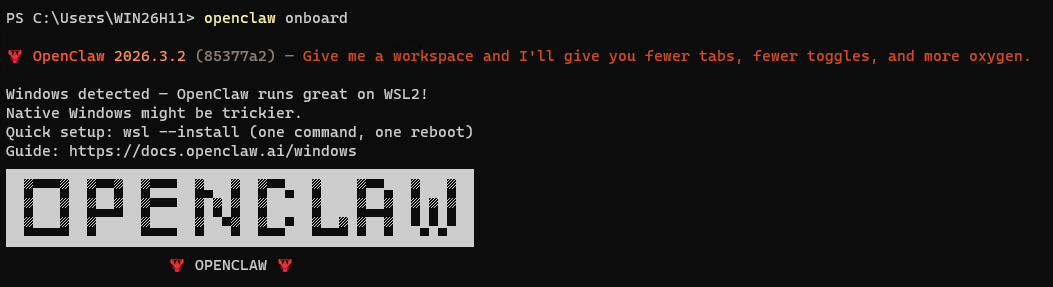
脚本运行结束后/电脑重启后,直接输入运行:

openclaw onboard

执行 onboard 时你会做的事情:

  1. 选择模型:你可以选择连接在线 API(如 DeepSeek、OpenAI)或者使用本地模型。
  2. 定义角色:你可以告诉它你是建筑工程专家,还是 Python 开发者。
  3. 关联目录:建议把你的 目录 (kaixinit) 或者 文档目录 关联进去。

输出结果,安装过程中的输出如下:

PS C:\Users\WIN26H11> # ==========================================================
PS C:\Users\WIN26H11> # OpenClaw 2026 全系统初始化 - 物理镜像增强版
PS C:\Users\WIN26H11> # 目标:解决 GitHub 连不上、权限被禁、路径不识别、假文件下载
PS C:\Users\WIN26H11> # ==========================================================
PS C:\Users\WIN26H11>
PS C:\Users\WIN26H11> # 1. 权限与策略解锁 (解决 npm.ps1 无法运行的问题)
PS C:\Users\WIN26H11> Set-ExecutionPolicy -ExecutionPolicy RemoteSigned -Scope CurrentUser -Force
PS C:\Users\WIN26H11> Write-Host ">>> 系统策略已解锁,开始执行全环境物理植入 <<<" -ForegroundColor Cyan
>>> 系统策略已解锁,开始执行全环境物理植入 <<<
PS C:\Users\WIN26H11>
PS C:\Users\WIN26H11> # 2. 核心组件强装 (全部采用国内镜像物理直链)
PS C:\Users\WIN26H11> Write-Host "[1/4] 正在从高速镜像站拉取 Node, Python, Git..." -ForegroundColor Yellow
[1/4] 正在从高速镜像站拉取 Node, Python, Git...
PS C:\Users\WIN26H11>
PS C:\Users\WIN26H11> $tools = @{
>>     "Node.js" = "https://mirrors.huaweicloud.com/nodejs/v24.14.0/node-v24.14.0-x64.msi";
>>     "Python"  = "https://npmmirror.com/mirrors/python/3.11.9/python-3.11.9-amd64.exe";
>>     "Git"     = "https://npmmirror.com/mirrors/git-for-windows/v2.53.0.windows.1/Git-2.53.0-64-bit.exe"
>> }
PS C:\Users\WIN26H11>
PS C:\Users\WIN26H11> foreach ($name in $tools.Keys) {
>>     $ext = if ($name -eq "Node.js") { "msi" } else { "exe" }
>>     $tempPath = "$env:TEMP\$name.$ext"
>>     Write-Host "正在高速下载 $name..." -ForegroundColor Gray
>>     curl.exe -L -o $tempPath $tools[$name]
>>
>>     # 自动执行静默安装
>>     if ($name -eq "Node.js") { Start-Process msiexec.exe -ArgumentList "/i `"$tempPath`" /qn /norestart" -Wait }
>>     if ($name -eq "Python")  { Start-Process $tempPath -ArgumentList "/quiet InstallAllUsers=1 PrependPath=1" -Wait }
>>     if ($name -eq "Git")     { Start-Process $tempPath -ArgumentList "/VERYSILENT /NORESTART /NOCANCEL /SP-" -Wait }
>>     Remove-Item $tempPath
>> }
正在高速下载 Git...
  % Total    % Received % Xferd  Average Speed   Time    Time     Time  Current
                                 Dload  Upload   Total   Spent    Left  Speed
100   154  100   154    0     0    187      0 --:--:-- --:--:-- --:--:--   187
100 61.5M  100 61.5M    0     0  7718k      0  0:00:08  0:00:08 --:--:-- 6465k
正在高速下载 Node.js...
  % Total    % Received % Xferd  Average Speed   Time    Time     Time  Current
                                 Dload  Upload   Total   Spent    Left  Speed
100 30.7M  100 30.7M    0     0  9393k      0  0:00:03  0:00:03 --:--:-- 9396k
正在高速下载 Python...
  % Total    % Received % Xferd  Average Speed   Time    Time     Time  Current
                                 Dload  Upload   Total   Spent    Left  Speed
100   154  100   154    0     0    828      0 --:--:-- --:--:-- --:--:--   832
100 25.0M  100 25.0M    0     0  9411k      0  0:00:02  0:00:02 --:--:-- 12.0M
PS C:\Users\WIN26H11>
PS C:\Users\WIN26H11> # 3. 部署 CMake 与 VS 编译链 (本地编译 node-llama-cpp 必需)
PS C:\Users\WIN26H11> Write-Host "[2/4] 正在配置 C++ 编译环境 (预计需 3-5 分钟)..." -ForegroundColor Yellow
[2/4] 正在配置 C++ 编译环境 (预计需 3-5 分钟)...
PS C:\Users\WIN26H11>
PS C:\Users\WIN26H11> # CMake 华为云镜像 (30MB+ 完整包)
PS C:\Users\WIN26H11> $cmakeMsi = "$env:TEMP\cmake_setup.msi"
PS C:\Users\WIN26H11> curl.exe -L -o $cmakeMsi "https://mirrors.huaweicloud.com/cmake/v3.31.5/cmake-3.31.5-windows-x86_64.msi"
  % Total    % Received % Xferd  Average Speed   Time    Time     Time  Current
                                 Dload  Upload   Total   Spent    Left  Speed
100  9096    0  9096    0     0  42054      0 --:--:-- --:--:-- --:--:-- 42306
PS C:\Users\WIN26H11> Start-Process msiexec.exe -ArgumentList "/i `"$cmakeMsi`" /qn /norestart ADDLOCAL=CMake_Path" -Wait
PS C:\Users\WIN26H11>
PS C:\Users\WIN26H11> # VS 2022 编译核心 (静默安装)
PS C:\Users\WIN26H11> $vsBoot = "$env:TEMP\vs_setup.exe"
PS C:\Users\WIN26H11> curl.exe -L -o $vsBoot "https://aka.ms/vs/17/release/vs_buildtools.exe"
  % Total    % Received % Xferd  Average Speed   Time    Time     Time  Current
                                 Dload  Upload   Total   Spent    Left  Speed
  0     0    0     0    0     0      0      0 --:--:--  0:00:01 --:--:--     0
100 4354k  100 4354k    0     0  1440k      0  0:00:03  0:00:03 --:--:-- 4350k
PS C:\Users\WIN26H11> $vsParams = "--add Microsoft.VisualStudio.Workload.VCTools --add Microsoft.VisualStudio.Component.VC.CMake.Project --includeRecommended --passive --norestart --wait"
PS C:\Users\WIN26H11> Start-Process $vsBoot -ArgumentList $vsParams -Wait
PS C:\Users\WIN26H11>
PS C:\Users\WIN26H11> # 4. 路径刷新与加速重写 (整合谢工核心逻辑)
PS C:\Users\WIN26H11> Write-Host "[3/4] 正在同步系统环境变量并配置加速..." -ForegroundColor Yellow
[3/4] 正在同步系统环境变量并配置加速...
PS C:\Users\WIN26H11> $env:Path = [System.Environment]::GetEnvironmentVariable("Path","Machine") + ";" + [System.Environment]::GetEnvironmentVariable("Path","User")
PS C:\Users\WIN26H11>
PS C:\Users\WIN26H11> # Git 加速配置 (换用目前最稳的加速站)
PS C:\Users\WIN26H11> if (Get-Command git -ErrorAction SilentlyContinue) {
>>     git config --global url."https://ghproxy.net/https://github.com/".insteadOf "https://github.com/"
>>     git config --global url."https://ghproxy.net/https://github.com/".insteadOf "ssh://git@github.com/"
>> }
PS C:\Users\WIN26H11>
PS C:\Users\WIN26H11> # 锁定 Python 环境变量
PS C:\Users\WIN26H11> $realPython = (Get-Command python.exe -ErrorAction SilentlyContinue).Source
PS C:\Users\WIN26H11> if ($realPython) { $env:PYTHON = $realPython }
PS C:\Users\WIN26H11>
PS C:\Users\WIN26H11> # 5. 发起总攻:安装 OpenClaw
PS C:\Users\WIN26H11> Write-Host "[4/4] 环境已全线打通,正在执行 OpenClaw 编译安装..." -ForegroundColor Green
[4/4] 环境已全线打通,正在执行 OpenClaw 编译安装...
PS C:\Users\WIN26H11> & cmd /c "npm config set registry https://registry.npmmirror.com"
PS C:\Users\WIN26H11> & cmd /c "npm install -g openclaw@latest --foreground-scripts"
npm warn deprecated inflight@1.0.6: This module is not supported, and leaks memory. Do not use it. Check out lru-cache if you want a good and tested way to coalesce async requests by a key value, which is much more comprehensive and powerful.
npm warn deprecated are-we-there-yet@2.0.0: This package is no longer supported.
npm warn deprecated gauge@3.0.2: This package is no longer supported.
npm warn deprecated rimraf@3.0.2: Rimraf versions prior to v4 are no longer supported
npm warn deprecated glob@7.2.3: Glob versions prior to v9 are no longer supported
npm warn deprecated npmlog@5.0.1: This package is no longer supported.

> @whiskeysockets/baileys@7.0.0-rc.9 preinstall
> node ./engine-requirements.js


> @discordjs/opus@0.10.0 install
> node-pre-gyp install --fallback-to-build

node-pre-gyp info it worked if it ends with ok
node-pre-gyp info using node-pre-gyp@0.4.5
node-pre-gyp info using node@24.14.0 | win32 | x64
(node:7272) [DEP0169] DeprecationWarning: `url.parse()` behavior is not standardized and prone to errors that have security implications. Use the WHATWG URL API instead. CVEs are not issued for `url.parse()` vulnerabilities.
(Use `node --trace-deprecation ...` to show where the warning was created)
node-pre-gyp info check checked for "C:\Users\WIN26H11\AppData\Roaming\npm\node_modules\openclaw\node_modules\@discordjs\opus\prebuild\node-v137-napi-v3-win32-x64-unknown-unknown\opus.node" (not found)
node-pre-gyp http GET https://github.com/discordjs/opus/releases/download/v0.10.0/opus-v0.10.0-node-v137-napi-v3-win32-x64-unknown-unknown.tar.gz
node-pre-gyp ERR! install response status 404 Not Found on https://github.com/discordjs/opus/releases/download/v0.10.0/opus-v0.10.0-node-v137-napi-v3-win32-x64-unknown-unknown.tar.gz
node-pre-gyp WARN Pre-built binaries not installable for @discordjs/opus@0.10.0 and node@24.14.0 (node-v137 ABI, unknown) (falling back to source compile with node-gyp)
node-pre-gyp WARN Hit error response status 404 Not Found on https://github.com/discordjs/opus/releases/download/v0.10.0/opus-v0.10.0-node-v137-napi-v3-win32-x64-unknown-unknown.tar.gz
gyp info it worked if it ends with ok
gyp info using node-gyp@12.2.0
gyp info using node@24.14.0 | win32 | x64
gyp info ok
gyp info it worked if it ends with ok
gyp info using node-gyp@12.2.0
gyp info using node@24.14.0 | win32 | x64
(node:11832) [DEP0169] DeprecationWarning: `url.parse()` behavior is not standardized and prone to errors that have security implications. Use the WHATWG URL API instead. CVEs are not issued for `url.parse()` vulnerabilities.
(Use `node --trace-deprecation ...` to show where the warning was created)
(node:11832) [DEP0190] DeprecationWarning: Passing args to a child process with shell option true can lead to security vulnerabilities, as the arguments are not escaped, only concatenated.
gyp info find Python using Python version 3.11.9 found at "C:\Program Files\Python311\python.exe"

gyp http GET https://nodejs.org/download/release/v24.14.0/node-v24.14.0-headers.tar.gz
gyp http 200 https://nodejs.org/download/release/v24.14.0/node-v24.14.0-headers.tar.gz
gyp http GET https://nodejs.org/download/release/v24.14.0/SHASUMS256.txt
gyp http GET https://nodejs.org/download/release/v24.14.0/win-x64/node.lib
gyp http 200 https://nodejs.org/download/release/v24.14.0/SHASUMS256.txt
gyp http 200 https://nodejs.org/download/release/v24.14.0/win-x64/node.lib
gyp info find VS using VS2022 (17.14.37012.4) found at:
gyp info find VS "C:\Program Files (x86)\Microsoft Visual Studio\2022\BuildTools"
gyp info find VS run with --verbose for detailed information
gyp info spawn C:\Program Files\Python311\python.exe
gyp info spawn args [
gyp info spawn args 'C:\\Program Files\\nodejs\\node_modules\\npm\\node_modules\\node-gyp\\gyp\\gyp_main.py',
gyp info spawn args 'binding.gyp',
gyp info spawn args '-f',
gyp info spawn args 'msvs',
gyp info spawn args '-I',
gyp info spawn args 'C:\\Users\\WIN26H11\\AppData\\Roaming\\npm\\node_modules\\openclaw\\node_modules\\@discordjs\\opus\\build\\config.gypi',
gyp info spawn args '-I',
gyp info spawn args 'C:\\Program Files\\nodejs\\node_modules\\npm\\node_modules\\node-gyp\\addon.gypi',
gyp info spawn args '-I',
gyp info spawn args 'C:\\Users\\WIN26H11\\AppData\\Local\\node-gyp\\Cache\\24.14.0\\include\\node\\common.gypi',
gyp info spawn args '-Dlibrary=shared_library',
gyp info spawn args '-Dvisibility=default',
gyp info spawn args '-Dnode_root_dir=C:\\Users\\WIN26H11\\AppData\\Local\\node-gyp\\Cache\\24.14.0',
gyp info spawn args '-Dnode_gyp_dir=C:\\Program Files\\nodejs\\node_modules\\npm\\node_modules\\node-gyp',
gyp info spawn args '-Dnode_lib_file=C:\\\\Users\\\\WIN26H11\\\\AppData\\\\Local\\\\node-gyp\\\\Cache\\\\24.14.0\\\\<(target_arch)\\\\node.lib',
gyp info spawn args '-Dmodule_root_dir=C:\\Users\\WIN26H11\\AppData\\Roaming\\npm\\node_modules\\openclaw\\node_modules\\@discordjs\\opus',
gyp info spawn args '-Dnode_engine=v8',
gyp info spawn args '--depth=.',
gyp info spawn args '--no-parallel',
gyp info spawn args '--generator-output',
gyp info spawn args 'C:\\Users\\WIN26H11\\AppData\\Roaming\\npm\\node_modules\\openclaw\\node_modules\\@discordjs\\opus\\build',
gyp info spawn args '-Goutput_dir=.'
gyp info spawn args ]
gyp info ok
gyp info it worked if it ends with ok
gyp info using node-gyp@12.2.0
gyp info using node@24.14.0 | win32 | x64
gyp info spawn C:\Program Files (x86)\Microsoft Visual Studio\2022\BuildTools\MSBuild\Current\Bin\MSBuild.exe
gyp info spawn args [
gyp info spawn args 'build/binding.sln',
gyp info spawn args '/clp:Verbosity=minimal',
gyp info spawn args '/nologo',
gyp info spawn args '/nodeReuse:false',
gyp info spawn args '/p:Configuration=Release;Platform=x64'
gyp info spawn args ]

  opus_multistream.c
  opus_projection_encoder.c
  analysis.c
  mlp_data.c
  opus_multistream_encoder.c
  opus_projection_decoder.c
  mapping_matrix.c
  opus_compare.c
  mlp.c
  opus.c
  opus_multistream_decoder.c
  opus_decoder.c
  repacketizer.c
  opus_encoder.c
  decode_frame.c
  inner_product_FLP.c
  scale_vector_FLP.c
  find_pred_coefs_FLP.c
  schur_FLP.c
  warped_autocorrelation_FLP.c
  burg_modified_FLP.c
  find_LPC_FLP.c
  LPC_inv_pred_gain_FLP.c
  scale_copy_vector_FLP.c
  noise_shape_analysis_FLP.c
  pitch_analysis_core_FLP.c
  bwexpander_FLP.c
  LTP_analysis_filter_FLP.c
  LTP_scale_ctrl_FLP.c
  corrMatrix_FLP.c
  encode_frame_FLP.c
  sort_FLP.c
  find_pitch_lags_FLP.c
  residual_energy_FLP.c
  LPC_analysis_filter_FLP.c
  autocorrelation_FLP.c
  k2a_FLP.c
  regularize_correlations_FLP.c
  find_LTP_FLP.c
  energy_FLP.c
  apply_sine_window_FLP.c
  wrappers_FLP.c
  process_gains_FLP.c
  stereo_quant_pred.c
  LPC_inv_pred_gain.c
  process_NLSFs.c
  NSQ.c
  check_control_input.c
  NLSF_del_dec_quant.c
  LPC_analysis_filter.c
  dec_API.c
  resampler.c
  sort.c
  VAD.c
  resampler_private_AR2.c
  LPC_fit.c
  control_SNR.c
  decode_parameters.c
  pitch_est_tables.c
  warped_autocorrelation_FIX.c
  apply_sine_window_FIX.c
  residual_energy16_FIX.c
  schur64_FIX.c
  residual_energy_FIX.c
  noise_shape_analysis_FIX.c
  encode_frame_FIX.c
  schur_FIX.c
  autocorr_FIX.c
C:\Users\WIN26H11\AppData\Roaming\npm\node_modules\openclaw\node_modules\@discordjs\opus\deps\opus\silk\fixed\autocorr_
FIX.c(47,29): warning C4133: “函数”: 从“const opus_int16 *”到“const opus_val16 *”的类型不兼容 [C:\Users\WIN26H11\AppData\Roaming\
npm\node_modules\openclaw\node_modules\@discordjs\opus\build\deps\libopus.vcxproj]
C:\Users\WIN26H11\AppData\Roaming\npm\node_modules\openclaw\node_modules\@discordjs\opus\deps\opus\silk\fixed\autocorr_
FIX.c(47,40): warning C4133: “函数”: 从“opus_int32 *”到“opus_val32 *”的类型不兼容 [C:\Users\WIN26H11\AppData\Roaming\npm\node_mod
ules\openclaw\node_modules\@discordjs\opus\build\deps\libopus.vcxproj]
  burg_modified_FIX.c
C:\Users\WIN26H11\AppData\Roaming\npm\node_modules\openclaw\node_modules\@discordjs\opus\deps\opus\silk\fixed\burg_modi
fied_FIX.c(98,30): warning C4133: “函数”: 从“const opus_int16 *”到“const opus_val16 *”的类型不兼容 [C:\Users\WIN26H11\AppData\Roa
ming\npm\node_modules\openclaw\node_modules\@discordjs\opus\build\deps\libopus.vcxproj]
C:\Users\WIN26H11\AppData\Roaming\npm\node_modules\openclaw\node_modules\@discordjs\opus\deps\opus\silk\fixed\burg_modi
fied_FIX.c(98,43): warning C4133: “函数”: 从“const opus_int16 *”到“const opus_val16 *”的类型不兼容 [C:\Users\WIN26H11\AppData\Roa
ming\npm\node_modules\openclaw\node_modules\@discordjs\opus\build\deps\libopus.vcxproj]
C:\Users\WIN26H11\AppData\Roaming\npm\node_modules\openclaw\node_modules\@discordjs\opus\deps\opus\silk\fixed\burg_modi
fied_FIX.c(98,48): warning C4133: “函数”: 从“opus_int32 [24]”到“opus_val32 *”的类型不兼容 [C:\Users\WIN26H11\AppData\Roaming\npm\
node_modules\openclaw\node_modules\@discordjs\opus\build\deps\libopus.vcxproj]
  pitch_analysis_core_FIX.c
C:\Users\WIN26H11\AppData\Roaming\npm\node_modules\openclaw\node_modules\@discordjs\opus\deps\opus\silk\fixed\pitch_ana
lysis_core_FIX.c(200,27): warning C4133: “函数”: 从“const opus_int16 *”到“const opus_val16 *”的类型不兼容 [C:\Users\WIN26H11\AppD
ata\Roaming\npm\node_modules\openclaw\node_modules\@discordjs\opus\build\deps\libopus.vcxproj]
C:\Users\WIN26H11\AppData\Roaming\npm\node_modules\openclaw\node_modules\@discordjs\opus\deps\opus\silk\fixed\pitch_ana
lysis_core_FIX.c(200,50): warning C4133: “函数”: 从“const opus_int16 *”到“const opus_val16 *”的类型不兼容 [C:\Users\WIN26H11\AppD
ata\Roaming\npm\node_modules\openclaw\node_modules\@discordjs\opus\build\deps\libopus.vcxproj]
C:\Users\WIN26H11\AppData\Roaming\npm\node_modules\openclaw\node_modules\@discordjs\opus\deps\opus\silk\fixed\pitch_ana
lysis_core_FIX.c(200,66): warning C4133: “函数”: 从“opus_int32 *”到“opus_val32 *”的类型不兼容 [C:\Users\WIN26H11\AppData\Roaming\
npm\node_modules\openclaw\node_modules\@discordjs\opus\build\deps\libopus.vcxproj]
C:\Users\WIN26H11\AppData\Roaming\npm\node_modules\openclaw\node_modules\@discordjs\opus\deps\opus\silk\fixed\pitch_ana
lysis_core_FIX.c(616,27): warning C4133: “函数”: 从“const opus_int16 *”到“const opus_val16 *”的类型不兼容 [C:\Users\WIN26H11\AppD
ata\Roaming\npm\node_modules\openclaw\node_modules\@discordjs\opus\build\deps\libopus.vcxproj]
C:\Users\WIN26H11\AppData\Roaming\npm\node_modules\openclaw\node_modules\@discordjs\opus\deps\opus\silk\fixed\pitch_ana
lysis_core_FIX.c(616,62): warning C4133: “函数”: 从“const opus_int16 *”到“const opus_val16 *”的类型不兼容 [C:\Users\WIN26H11\AppD
ata\Roaming\npm\node_modules\openclaw\node_modules\@discordjs\opus\build\deps\libopus.vcxproj]
C:\Users\WIN26H11\AppData\Roaming\npm\node_modules\openclaw\node_modules\@discordjs\opus\deps\opus\silk\fixed\pitch_ana
lysis_core_FIX.c(616,74): warning C4133: “函数”: 从“opus_int32 *”到“opus_val32 *”的类型不兼容 [C:\Users\WIN26H11\AppData\Roaming\
npm\node_modules\openclaw\node_modules\@discordjs\opus\build\deps\libopus.vcxproj]
  find_LTP_FIX.c
  find_LPC_FIX.c
  corrMatrix_FIX.c
  k2a_FIX.c
  LTP_scale_ctrl_FIX.c
  process_gains_FIX.c
  k2a_Q16_FIX.c
  regularize_correlations_FIX.c
  LTP_analysis_filter_FIX.c
  vector_ops_FIX.c
  find_pitch_lags_FIX.c
  find_pred_coefs_FIX.c
  control_audio_bandwidth.c
  decoder_set_fs.c
  NLSF_unpack.c
  bwexpander.c
  resampler_rom.c
  shell_coder.c
  decode_pulses.c
  bwexpander_32.c
  decode_core.c
  PLC.c
  tables_NLSF_CB_WB.c
  table_LSF_cos.c
  tables_pulses_per_block.c
  tables_gain.c
  inner_prod_aligned.c
  resampler_down2_3.c
  NSQ_del_dec.c
  decode_pitch.c
  NLSF_VQ_weights_laroia.c
  interpolate.c
  debug.c
  tables_other.c
  LP_variable_cutoff.c
  NLSF_decode.c
  encode_pulses.c
  control_codec.c
  stereo_LR_to_MS.c
  HP_variable_cutoff.c
  encode_indices.c
  init_decoder.c
  stereo_encode_pred.c
  NLSF_VQ.c
  init_encoder.c
  resampler_private_IIR_FIR.c
  resampler_private_up2_HQ.c
  sigm_Q15.c
  sum_sqr_shift.c
  tables_LTP.c
  resampler_down2.c
  code_signs.c
  tables_NLSF_CB_NB_MB.c
  gain_quant.c
  tables_pitch_lag.c
  NLSF_stabilize.c
  stereo_find_predictor.c
  A2NLSF.c
  NLSF2A.c
  VQ_WMat_EC.c
  NLSF_encode.c
  log2lin.c
  stereo_decode_pred.c
  lin2log.c
  CNG.c
  enc_API.c
  biquad_alt.c
  quant_LTP_gains.c
  resampler_private_down_FIR.c
  ana_filt_bank_1.c
  stereo_MS_to_LR.c
  decode_indices.c
  rate.c
  entdec.c
  modes.c
  celt_lpc.c
  laplace.c
  cwrs.c
  celt.c
  entcode.c
  celt_decoder.c
  celt_encoder.c
  mdct.c
  quant_bands.c
  vq.c
  bands.c
  kiss_fft.c
  entenc.c
  mathops.c
  pitch.c
  win_delay_load_hook.cc
  libopus.vcxproj -> C:\Users\WIN26H11\AppData\Roaming\npm\node_modules\openclaw\node_modules\@discordjs\opus\build\Rel
  ease\\libopus.lib
  node-opus.cc
C:\Users\WIN26H11\AppData\Roaming\npm\node_modules\openclaw\node_modules\@discordjs\opus\src\node-opus.h(8,7): warning
C4099: “OpusEncoder”: 类型名称以前使用“struct”现在使用的是“class” [C:\Users\WIN26H11\AppData\Roaming\npm\node_modules\openclaw\node_m
odules\@discordjs\opus\build\opus.vcxproj]
  (编译源文件“../src/node-opus.cc”)
      C:\Users\WIN26H11\AppData\Roaming\npm\node_modules\openclaw\node_modules\@discordjs\opus\src\node-opus.h(8,7):
      参见“OpusEncoder”的声明

  win_delay_load_hook.cc
    正在创建库 C:\Users\WIN26H11\AppData\Roaming\npm\node_modules\openclaw\node_modules\@discordjs\opus\prebuild\node-v137-n
  api-v3-win32-x64-unknown-unknown\opus.lib 和对象 C:\Users\WIN26H11\AppData\Roaming\npm\node_modules\openclaw\node_module
  s\@discordjs\opus\prebuild\node-v137-napi-v3-win32-x64-unknown-unknown\opus.exp
  正在生成代码
  Previous IPDB not found, fall back to full compilation.
  All 775 functions were compiled because no usable IPDB/IOBJ from previous compilation was found.
  已完成代码的生成
  opus.vcxproj -> C:\Users\WIN26H11\AppData\Roaming\npm\node_modules\openclaw\node_modules\@discordjs\opus\prebuild\nod
  e-v137-napi-v3-win32-x64-unknown-unknown\opus.node
gyp info ok
node-pre-gyp info ok

> koffi@2.15.1 install
> node src/cnoke/cnoke.js -p . -d src/koffi --prebuild


> sharp@0.34.5 install
> node install/check.js || npm run build


> node-llama-cpp@3.16.2 postinstall
> node ./dist/cli/cli.js postinstall

[node-llama-cpp] A prebuilt binary was not found, falling back to using no GPU

> protobufjs@7.5.4 postinstall
> node scripts/postinstall


> protobufjs@6.8.8 postinstall
> node scripts/postinstall


added 693 packages in 1m

130 packages are looking for funding
  run `npm fund` for details
PS C:\Users\WIN26H11>
PS C:\Users\WIN26H11> Write-Host "================================================" -ForegroundColor Cyan
================================================
PS C:\Users\WIN26H11> Write-Host ">>> 恭喜谢工!全环境自动化部署完成 <<<" -ForegroundColor Green
>>> 恭喜谢工!全环境自动化部署完成 <<<
PS C:\Users\WIN26H11> Write-Host ">>> 启动指令:openclaw onboard <<<" -ForegroundColor White
>>> 启动指令:openclaw onboard <<<
PS C:\Users\WIN26H11> Write-Host "================================================" -ForegroundColor Cyan

原创文章,作者:开心电脑网,如若转载,请注明出处。

(0)
上一篇 2025年11月8日
下一篇 2026年3月7日

相关推荐

发表回复

您的邮箱地址不会被公开。 必填项已用 * 标注