#首先测试3389的连通性:
Test-NetConnection -ComputerName 10.0.0.2 -Port 3389 -InformationLevel Detailed
#警告: TCP connect to (10.0.0.2 : 3389) failed
#输出结果如下:
ComputerName            : 10.0.0.2
RemoteAddress           : 10.0.0.2
RemotePort              : 3389
NameResolutionResults   : 10.0.0.2
                          DESKTOP-249GJRA
MatchingIPsecRules      :
NetworkIsolationContext : Internet
InterfaceAlias          : 以太网
SourceAddress           : 10.0.0.5
NetRoute (NextHop)      : 0.0.0.0
TcpTestSucceeded        : False
根据以上输出结果显示:
Ping 能通:说明 10.0.0.2 可达,网络连通性 OK。
TcpTestSucceeded = False:TCP 端口 3389(RDP)连接失败。
# 检查防火墙规则
Get-NetFirewallRule -DisplayName '*Remote Desktop*' | Format-Table Name, Enabled, Action

Name                                   Enabled Action
----                                   ------- ------
{3704a17a-5900-448c-89b7-cfeeerrrr3}    True  Allow
#检查服务状态
Get-Service -Name TermService
#输出结果如下:
Status   Name               DisplayName
------   ----               -----------
Running  TermService        Remote Desktop Services
#添加允许RDP的防火墙规则
New-NetFirewallRule -DisplayName "Allow RDP" -Direction Inbound -Protocol TCP -LocalPort 3389 -Action Allow
#输出结果如下:
Name                          : {ef8282d6-6620-4af2-b6fc-0c554547557}
DisplayName                   : Allow RDP
Description                   :
DisplayGroup                  :
Group                         :
Enabled                       : True
Profile                       : Any
Platform                      : {}
Direction                     : Inbound
Action                        : Allow
EdgeTraversalPolicy           : Block
LooseSourceMapping            : False
LocalOnlyMapping              : False
Owner                         :
PrimaryStatus                 : OK
Status                        : 已从存储区成功分析规则。 (65536)
EnforcementStatus             : NotApplicable
PolicyStoreSource             : PersistentStore
PolicyStoreSourceType         : Local
RemoteDynamicKeywordAddresses :
PolicyAppId                   :
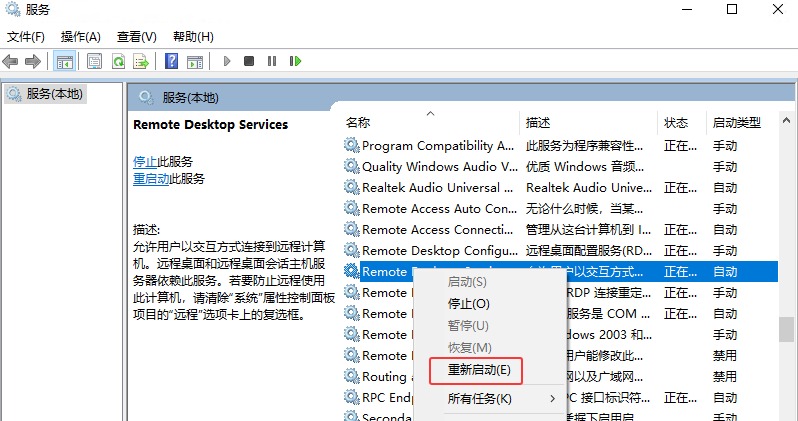
#services.msc 服务中查看 Remote Desktop Services,登陆身份选择【本地系统账户】,Remote Desktop Services右键【重新启动】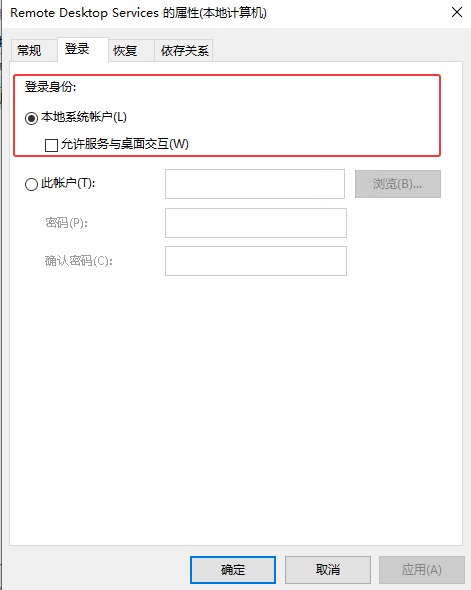
#继续测试3389的连通性:
Test-NetConnection -ComputerName 10.0.0.2 -Port 3389 -InformationLevel Detailed
#输出结果如下:
ComputerName            : 10.0.0.2
RemoteAddress           : 10.0.0.2
RemotePort              : 3389
NameResolutionResults   : 10.0.0.2
                          DESKTOP-249GJRA
MatchingIPsecRules      :
NetworkIsolationContext : Internet
InterfaceAlias          : 以太网
SourceAddress           : 10.0.0.5
NetRoute (NextHop)      : 0.0.0.0
TcpTestSucceeded        : True
通过以上输出结果TcpTestSucceeded : True,说明连通性通过,远程桌面正常登陆。
原创文章,作者:开心电脑网,如若转载,请注明出处。